
Every client gets its own control plane at its own address, for example acme.unifym.ai, and its environments beside it: dev.acme.unifym.ai, test.acme.unifym.ai, prod.acme.unifym.ai. Each environment has its own application, database and encryption key.
Book a demo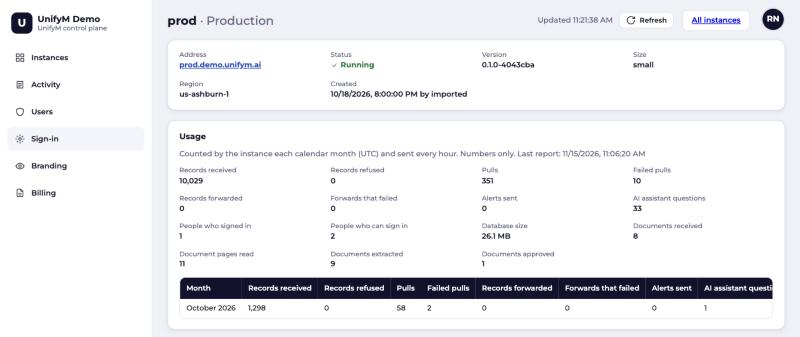
Your control plane
See every environment
Status, version and usage against your plan for each environment, and a 12-month history.
Request an environment
A new environment is a request away, approved by the UnifyM team and created for you.
Changes you can read first
Every create, upgrade, resize, backup or restore is a job with a plan you can read before it runs, and its log after.
Your maintenance window
Set a weekly window per environment. Upgrades and resizes asked for outside it wait for it; start one early or cancel it.
Promote settings
Copy dashboards, mappings, connections, alert rules, roles and document structures from dev to test to production, after a preview of every change. Secrets, users and data are never copied.
Backups and restore
See every backup, back up now, and ask for a restore with a clear statement of what changes. A backup is taken before every upgrade and resize.
Your people and sign-in
Your own identity provider and group mapping, Administrator and Viewer roles, and local accounts if you want them.
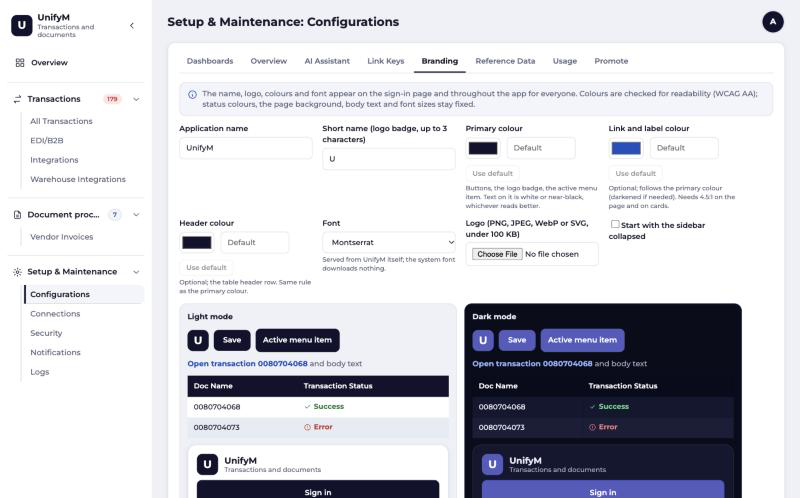
Your brand
Your logo, colors and font, set once and shown on your control plane and every environment, checked for readable contrast in light and dark mode.
Usage and invoices
Records and pages this month against your plan, emails at 80% and 100%, and your invoices on a Billing page, with a billing contact for your finance team.
Your brand, readable for everyone.
Set your name, logo, colors and font once. Every color is checked for readable contrast in light and dark mode before it is saved, and status colors stay fixed so a red error always means the same thing.
Run by the team that builds it.
The UnifyM team runs the platform on Oracle Cloud Infrastructure, approves changes beyond your plan, rolls new versions out in each environment's own window, watches for environments that stop reporting, and repairs a failed change. Production is never removed except at your request.
Watch an upgrade planned, scheduled and applied in its window.
Let's work together
Talk to the team that builds UnifyM. Book a demo, send us your security questionnaire, or ask what a plan includes.