
Integration platforms are built for many small messages. A 40 GB nightly extract, a mainframe file or a partner's archive ends up in a separate transfer tool and a few scripts, and nobody can say which file reached the target, whole and on time. UnifyM moves those files beside the transactions it already watches: from SFTP, S3 or OCI Object Storage to a folder, a bucket, a database table or your application, checked on the way and watched to the last byte.
Book a demo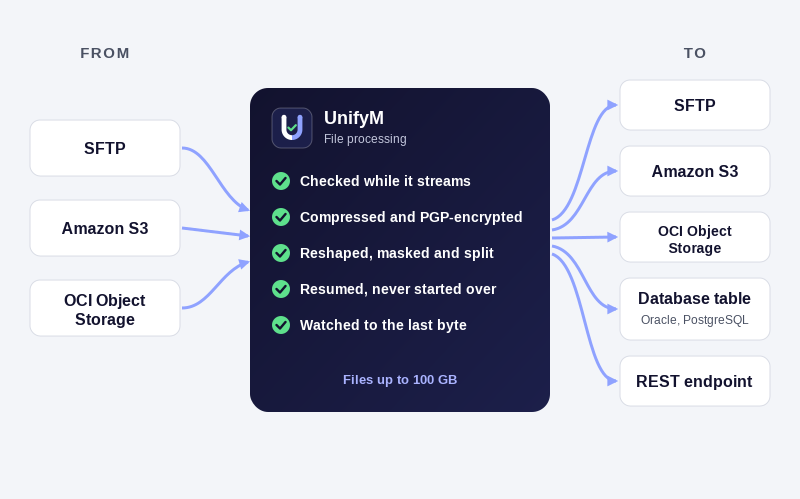
From a folder to a table, whole and checked
Describe the file interface
Pick the source (an SFTP folder, an S3 or Object Storage prefix) and a file name pattern such as
orders_*.csv.gz, then the target: a folder, a bucket, a database table or a REST endpoint.Start it your way
On a schedule, or as soon as a file arrives. A file still being written is left alone until it has stopped changing.
Moved in parts
Large files move in 64 MB parts, several at a time. Within one S3-compatible store, the store copies the parts itself and no byte passes through UnifyM.
Checked while it streams
Size, header, fields per row, record length, and the row count or a column's total against the file's trailer or control file. Rejected rows go to an errors file beside the delivered one.
Delivered, or held for a person
A file that fails its checks is delivered with the reasons, or held unnamed on the target until someone releases or rejects it.
Tidied up
The source file is left, moved to a processed folder or deleted, deletion only when the target's checksum matched.
Built for files that are too big for everything else
Up to 100 GB a file
Bytes never sit in memory as a whole or in a database, so file size is limited by time, not by memory. Every run shows its speed and time left.
Resumed, never started over
Every part done is recorded. After a dropped connection or a restart, the run continues from the parts not yet done; passing errors are retried on their own.
Integrity you can show
Each part's SHA-256 is recorded and every S3 upload is signed over it, so a changed part is refused. An SFTP file is written under a temporary name and renamed only when complete and the right size.
Compress and encrypt
Gzip and PGP (to your recipient's public key) on the way. UnifyM never holds a private key, so it never decrypts.
Reshape, mask and split
Select, rename and reorder columns, filter rows, convert CSV, fixed-width and JSON Lines, mask a column with fixed text or a hash, and split into pieces by rows or size. No scripts.
Load a table
Into Oracle, Autonomous Database included over a wallet, or PostgreSQL: append, replace, or merge on a key so a file sent twice loads safely. One transaction per file.
Tell your application
After a good delivery, UnifyM can post the file names, sizes, rows and checksums to your REST endpoint, or send the rows themselves for files up to 5 GB.
Watch every run
Progress, speed and time left while it moves; counts of moving, waiting, failed, held and delivered; search, sort and export the history.
Alerts that matter
Failed, held, stalled for 15 minutes, or late against the time a file is expected: through the same alert rules as your transactions, by email and Teams.
Not a hosted SFTP server for your partners and not an acceleration protocol: UnifyM reaches your endpoints over the internet or your allowed networks, from Oracle Cloud.
Bring the file that keeps failing. We will move it while you watch.
Let's work together
Talk to the team that builds UnifyM. Book a demo, send us your security questionnaire, or ask what a plan includes.